Friday, November 07, 2008

Capturing a Screenshot in Java (Using AWT)

Taking a screen shot in Java, sounds interesting right. Suddenly, While Searching to internet I came across this.


Here is the piece of code with which you can do this task:

import java.awt.AWTException;
import java.awt.Rectangle;
import java.awt.Robot;
import java.awt.image.BufferedImage;
import java.io.File;
import java.io.IOException;
import javax.imageio.ImageIO;

public class ScreenCapture {

public static void main(String[] args) {
try {
Robot robot = new Robot();

//The Size of Rectangle is Similar to Screen Resolution.
BufferedImage bi=robot.createScreenCapture(new Rectangle(1280,1024));

//This will write the image to this particular location
ImageIO.write(bi, "jpg", new File("C:/Ashish Docs/ScreenShot.jpg"));

} catch (AWTException e) {
e.printStackTrace();
} catch (IOException e) {
e.printStackTrace();
}catch(Exception ex){
ex.printStackTrace();
}
}
}


Don't worry guys the code is working and tested.
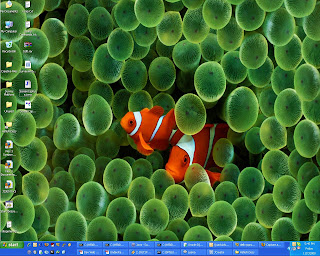
Here is the same output of this program:


I hope this will help. Cheers.....

Ashish Mishra

"There are some people who live in a Dream World, And There are some who face Reality; And Then there are those who turn One into the Other "


Thursday, October 16, 2008

Bridging Java and Adobe Air - Merapi

How Exiciting it will be if you can call Java directly from an AIR Application? I got excited when i read first time. And I feel you will also be. So why to wait, here is the solution for it........ Merapi
Merapi: A Bridge between Adobe AIR and Java
Merapi is a bridge between applications written in Java and those running in and created for Adobe AIR™ (Adobe Integrated Runtime™).

Merapi has been designed to run on a user's machine, along with an Adobe AIR™application and providea direct bridge between the Adobe AIR™ framework and Java, exposing the power and overall calabilities of the user's operating system, including 3rd party hardware devices.


With a light weight and straightforward API, developers can leverage the OS by writing Java companion applications for their AIR™ applications. Java programs treat Merapi as a bridge to the running Adobe AIR™ application and vice-versa. How to achieve this is given below:

Sending a message from ActionScript:

var message : Message = new Message();
message.data = "Hello from Merapi Flex.";
message.type = "Reply";
Bridge.instance.sendMessage( message );


Sending a message from Java:

Bridge bridge = Bridge.getInstance();
Message message = new Message();
message.setData("Hello from Merapi Java.");
bridge.sendMessage(message);


Receiving a message in Flex:

<merapi:BridgeInstance

id="bridge" result="handleResult(event)" />


in Script:

private function handleResult( event : ResultEvent ) : void{

var message : IMessage = event.result as IMessage;

}

Receiving a message in Java:

Bridge.getInstance().registerMessageHandler("Reply", messageHandlerInstance );

public void handleMessage( IMessage message ){

System.out.println( message.getData() );

}